Dashboard · Videos · Links · Yaesu · Mesh · Admin
🔍
Ragnar network tool
Ragnar network tool
Ragnar — A Pocket-Sized Network Security Lab *, *::before, *::after { box-sizing: border-box; margin: 0; padding: 0; } body { font-family: Georgia, 'Times New Roman', serif; font-size: 18px; line-heig…
Ragnar — A Pocket-Sized Network Security Lab
Open Source • Network Security • Raspberry Pi

Ragnar: A Pocket-Sized Network Security Lab

How a $20 Raspberry Pi Zero 2 W and a tiny e-ink screen became a serious network testing tool.

June 2026 • by PierreGode (open source project)

There's something satisfying about a security tool that fits in your shirt pocket. Ragnar — created by PierreGode and forked from the Bjorn project — is exactly that: an autonomous network scanner, vulnerability assessor, and offensive security toolkit that runs on a Raspberry Pi with a tiny 2.13-inch e-Paper display. It discovers hosts, finds open ports, checks for vulnerabilities, and reports results on that little ink screen in real time.

Think of it as a Tamagotchi for network administrators — except instead of feeding a digital pet, it's mapping your network's weaknesses while sitting quietly on a desk, drawing almost no power.

Important Ragnar is designed for educational and authorized testing purposes only. Only use it on networks you own or have explicit permission to test.

What Ragnar Actually Does

Ragnar isn't just a fancy nmap wrapper. It combines a broad set of capabilities that you'd normally need several separate tools to replicate:

Network Scanning Discovers live hosts and maps open ports across your network automatically.
Vulnerability Assessment Runs Nmap-based scans and, on beefier hardware, Nuclei (5,000+ templates), Nikto, SQLMap, and OWASP ZAP.
Threat Intelligence Fuses live data from CISA KEV, NVD CVE, AlienVault OTX, and MITRE ATT&CK in real time.
Wardriving Logs Wi-Fi networks, BLE devices, and cell towers with GPS positions. Exports to WiGLE CSV and KML.
Wi-Fi Isolation Testing AirSnitch checks whether a network properly isolates clients — useful for auditing guest Wi-Fi.
AI-Powered Analysis Optional GPT-5 Nano integration for vulnerability prioritisation and remediation advice.
Credential Testing Brute-force testing on FTP, SSH, SMB, RDP, Telnet, and SQL services.
E-Paper Display Real-time status showing targets found, vulnerabilities, credentials, and network info — no monitor needed.

Everything streams to a web dashboard accessible at http://<ragnar-ip>:8000, which includes a file manager, system monitor, hardware auto-detection, and a mobile-friendly Wi-Fi configuration portal.

The Hardware Build

The classic Ragnar build is deliberately minimal — and deliberately cheap. The whole point is a self-contained device you can leave running on a network without it being conspicuous or expensive to replace.

Raspberry Pi Zero 2 W ~$15–20 including shipping — don't pay more
Waveshare 2.13" e-Paper HAT waveshare.com
MicroSD card (16GB+) Class 10 recommended
USB power supply (5V/2A) Standard micro-USB
Pi Zero 2 W Pricing Warning A Pi Zero 2 W should cost you no more than around $20 shipped. Some resellers massively inflate prices. Check the official Raspberry Pi website or authorised distributors. If you're seeing $50+ listings, walk away.

Ragnar also runs headless (no display) on standard Debian or Ubuntu servers (AMD64, ARM64, ARMv7), and there's even a port for the WiFi Pineapple Pager with its full-colour LCD screen.

Supported Platforms

Platform Notes
Raspberry Pi Zero 2 W / Pi 4 / Pi 5 64-bit Pi OS (Debian Trixie, kernel 6.6+). Set username and hostname to ragnar. The Pi Zero 2 W automatically skips resource-heavy tools to stay lean.
Debian / Ubuntu Server (headless) Debian 11+ or Ubuntu 20.04+. AMD64, ARM64, or ARMv7. Minimum 2GB RAM, 2 CPU cores, 10GB disk. Systems with 8GB+ RAM get advanced scanning tools automatically.
WiFi Pineapple Pager Firmware 1.0.7+, PAGERCTL payload installed. Full-colour LCD display with button navigation and LED indicators.

Installing Ragnar

Installation is a single-script affair. Flash a fresh 64-bit Raspberry Pi OS image, set the hostname and username to ragnar, then:

wget https://raw.githubusercontent.com/PierreGode/Ragnar/main/install_ragnar.sh
sudo chmod +x install_ragnar.sh && sudo ./install_ragnar.sh

The installer detects your hardware automatically — Pi with e-Paper, headless server, or Pineapple Pager — and configures the right profile. It handles package installation, Python dependencies, ARM optimisations (using PiWheels on ARM hardware), and on 8GB+ RAM machines it installs the full advanced security toolkit automatically. Expect it to take a while; it pulls in a lot. Reboot when it finishes.

Full step-by-step instructions are in the official Install Guide on GitHub.

The Web Interface

Once running, everything is accessible via the web UI at http://<ragnar-ip>:8000. You get real-time network discovery results, the threat intelligence dashboard, a file manager with image gallery, system monitoring, and hardware profile information. If Ragnar can't reach a known Wi-Fi network, it creates a Ragnar hotspot (password: ragnarconnect) and you configure credentials via http://192.168.4.1:8000.

Advanced Mode: 8GB+ RAM

On a proper server with 8GB or more of RAM, Ragnar unlocks a significantly more powerful set of tools — real-time packet capture with tcpdump and tshark, deep protocol inspection (HTTP, DNS, SMB, SSH), automated anomaly detection, OWASP ZAP with authenticated scanning support (eight auth types including OAuth2, Bearer Token, and Cookie-based), Nuclei with over 5,000 templates from ProjectDiscovery, Nikto, SQLMap, and CVE correlation against NVD and CISA KEV feeds.

If you have an existing install and want to add these, just run:

cd /home/ragnar/Ragnar
sudo ./scripts/install_advanced_tools.sh
sudo systemctl restart ragnar

Bonus: Ragnar + Pwnagotchi

One of the more fun touches is a built-in bridge to Pwnagotchi. You can swap between Ragnar and Pwnagotchi modes via the web UI or with a physical PiSugar 3 button — double-tap or long press switches between them, with a 10-second cooldown to prevent accidental triggers. If you're building a multi-purpose security Pi, this is a neat way to get two tools in one device.

Where to Get It

Everything is open source under the MIT licence. The project has over 500 GitHub stars and is actively maintained.

→ Ragnar on GitHub
→ Full Install Guide
→ PierreGode's GitHub Profile
→ Waveshare 2.13" e-Paper HAT

Tip Set a static IP for your Ragnar device on your router. It makes life much easier, especially if you're switching between Ragnar and Pwnagotchi modes and the Wi-Fi adapter briefly reconnects with a different DHCP address.

Ragnar is an open source project by PierreGode, forked from Bjorn by infinition. MIT licensed. Use responsibly and only on networks you are authorised to test.


Best RC Cars for Bashing in the UK (2026)
Best RC Cars for Bashing in the UK (2026) Best RC Cars for Bashing in the UK (2026) So you want to bash — properly bash. Big air, full throttle, the occasional cartwheel across a car park. This guide …
Best RC Cars for Bashing in the UK (2026)

Best RC Cars for Bashing in the UK (2026)

So you want to bash — properly bash. Big air, full throttle, the occasional cartwheel across a car park. This guide covers the best RC cars available in the UK right now for exactly that, including a special look at FTX, the UK's own home-grown RC brand.


What Is Bashing?

Bashing is the opposite of racing. There are no lap times, no careful lines through corners — just you, a field, a skate park, or a gravel car park, and a car built to take punishment. Bashers are overbuilt by design: chunky suspension, reinforced chassis, and drivetrain components that can handle repeated impacts and the occasional 10-foot drop.

If that sounds like your kind of fun, read on.


FTX — The UK's Own RC Brand

Before we get into the full list, FTX deserves a special mention. FTX is a home-grown UK RC brand from CML Distribution, and they've been bringing quality radio-controlled cars, trucks, and buggies to the UK for over a decade. Designed and distributed from the UK (manufactured in China, like virtually everything in the hobby), they're as close to British-made as the RC world gets.

FTX models are thoroughly tested to meet the standards of bashers, racers, and enthusiasts — and they're stocked by most major UK hobby shops, which means parts and support are easy to come by.

FTX Carnage Brushless 2.0 — Best Value Basher

The Carnage Brushless 2.0 is FTX's most popular bashing truck for good reason. It's a 1/10 scale monster truck running a Hobbywing 50A brushless ESC and a 2500KV motor — proper hobby-grade electronics, not toy-shop fare. It's ready to run straight out of the box, eats rough terrain, and won't break the bank. If you're stepping up from a toy-grade car for the first time, this is an excellent place to land.

FTX Outlaw Brushless — Buggy Bashing

The Outlaw is FTX's buggy basher, and the brushless version takes it to a different level entirely. Better energy efficiency, higher top speed, and a chassis that handles jumps and rough ground well. A great all-rounder if you prefer the lower, more agile feel of a buggy over a monster truck.

FTX MK2RS Brushless Rally Car — Mixed Terrain Fun

New for 2026, the MK2RS is built on a durable chassis with oil-filled adjustable shocks and metal gear differentials fitted as standard. It's designed to handle the full torque of the brushless system without flinching. Equally at home on tarmac, gravel, or dirt — a solid pick if you bash across varied surfaces.

FTX Grand Apache 1/7 8S Trophy Truck — Go Big or Go Home

At the top of the FTX range sits the Grand Apache — a 1/7 scale brushless trophy truck running on 8S power. This is a serious machine for serious bashing. The scale alone turns heads, and the performance backs it up. If you want the biggest, loudest, most attention-grabbing bash rig FTX makes, this is it.


The Rest of the Best — UK Bashing Picks for 2026

FTX is great, but it's not the only game in town. Here's how the wider market shapes up.

ARRMA Kraton 6S — The Gold Standard Basher

ARRMA makes some of the toughest RC cars on the market, and the Kraton is their flagship monster truck. The 6S version is brutally fast on brushless power, handles abuse exceptionally well, and the parts support is excellent. If you want something that goes big and doesn't disintegrate, this is the one. Expect to pay £400–£500, but you get every penny's worth.

ARRMA Typhon / Outcast 6S — Speed and Stunts

The Typhon is ARRMA's 6S buggy — lower and faster than the Kraton, ideal for speed bashing and big jumps. The Outcast is the stunt truck of the range: designed for wheelies, flips, and tyre-shredding action. Both are serious machines that survive serious use.

ARRMA Granite 4x4 3S — Best Entry-Level Basher

If you want ARRMA quality without the 6S price tag, the Granite 4x4 is the place to start. Massive Fortress tyres, a wheelie bar, and a chassis that absorbs punishment make it the most recommended beginner ARRMA for good reason. The monster truck format is forgiving of sloppy driving, and parts availability keeps repair costs low. Around £250–£300 and well worth it.

Traxxas X-Maxx / Sledge — Easiest to Live With

Traxxas is arguably the most user-friendly brand in the hobby. The X-Maxx and Sledge are both superb bashers, and while they sit at a premium price point, the warranty, customer service, and sheer breadth of parts support make them the easiest option to own long-term. If you're buying your first serious basher and want the fewest headaches, Traxxas is the safe choice.

KKPit KBT SP 1/8 Desert Truck — Kit Build Quality

For something a bit different, KKPit offer large-scale kit builds at competition-grade quality. The KBT SP Desert Truck is a 1/8 scale monster beetle kit (£449.99) designed for intensive bashing from the moment you finish building it. Unlike some kit cars that feel fragile once complete, KKPit vehicles are engineered specifically with bashing and racing in mind.


Where to Buy in the UK

All of the above are well-stocked at UK hobby retailers. Good places to start:

  • Wheelspin Models — wheelspinmodels.co.uk — major ARRMA and FTX stockist
  • RC Geeks — rcgeeks.co.uk — strong FTX range and good buyer guides
  • Modelsport UK — modelsport.co.uk — wide range, competitive pricing
  • Radio-Controlled.co.uk — good for KKPit and rally bashers
  • Access Models — accessmodels.co.uk — Arrma, Axial, Tamiya

Final Word

For pure bashing value in the UK, FTX punches well above its price point and deserves more credit than it often gets — especially the Carnage Brushless 2.0 and the new MK2RS. If budget allows and you want to step up to serious 6S bashing, ARRMA is the benchmark the rest of the market is chasing.

Either way, get out there and bash something.


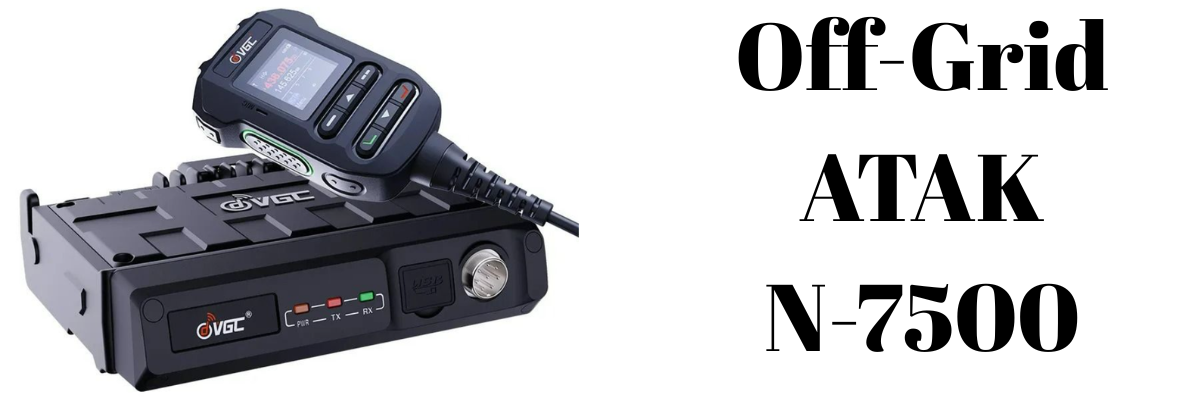
Off-Grid ATAK Capabilities with the VGC VR-N7500 Bluetooth Radio
Off-Grid ATAK Capabilities with the VGC VR-N7500 Bluetooth Radio Off-Grid ATAK Capabilities with the VGC VR-N7500 Bluetooth Radio The VGC VR-N7500 is a 50W headless dual-band mobile transceiver that h…
Off-Grid ATAK Capabilities with the VGC VR-N7500 Bluetooth Radio

Off-Grid ATAK Capabilities with the VGC VR-N7500 Bluetooth Radio

The VGC VR-N7500 is a 50W headless dual-band mobile transceiver that has quietly become one of the most capable off-grid ATAK radio platforms available for vehicle and overlander installs. With a built-in hardware KISS TNC accessible over Bluetooth, it removes the need for external TNC dongles or cables — and pairs directly with Android ATAK plugins to share positions, relay CoT data, and send GeoChat messages entirely without cell service or internet.

This post covers how the integration works, which plugins are available, what iOS users can and can't do, and the practical setup considerations.


What Makes the VR-N7500 ATAK-Capable

Most off-grid ATAK setups require an external TNC (Terminal Node Controller) to translate between the radio's audio and the digital data formats ATAK uses. The VR-N7500 skips that entirely. It has a native hardware KISS TNC built into the radio body, exposed wirelessly over Bluetooth SPP (Serial Port Profile). Any app or plugin that speaks KISS TNC can connect directly to the radio from an Android device — no cables, no adapters.

The KISS TNC capability was added via a firmware update in January 2025. Since then, users have confirmed compatibility with APRSdroid, RadioMail, and Winlink, as well as the ATAK plugins detailed below.

Other headline specs relevant to ATAK use:

  • 50W VHF / 40W UHF — significantly more range than handheld alternatives
  • Headless design: mounts out of sight in a vehicle, controlled entirely via smartphone or tablet over Bluetooth
  • Supports multiple simultaneous Bluetooth connections (phone, PTT button, headset)
  • APRS, SSTV, and packet radio support
  • Android and iOS compatible for the native HT App (basic radio control only)

How the ATAK Data Path Works

The integration follows a straightforward stack:

  1. ATAK Plugin on the Android EUD generates CoT (Cursor on Target) data — positions, markers, chat messages, routes
  2. The plugin connects to the radio via Bluetooth SPP and sends data using the KISS TNC protocol
  3. The radio encapsulates the data in AX.25 frames and transmits over VHF or UHF
  4. Other radios in range receive the frames, decode them, and pass the CoT data up to their connected ATAK instances

Incoming packets from other operators are decoded by the plugin and appear as contacts, map markers, and chat messages on your ATAK display. The entire loop runs without any infrastructure — no repeater, no server, no internet.


ATAK Plugin Options

BTECH Relay (Open Source)

Originally developed for the BTECH UV-PRO, the BTECH Relay plugin uses the same Bluetooth SPP + KISS TNC interface that the VR-N7500 exposes, making it a strong compatibility candidate. It is free and open source, available on GitHub.

Capabilities include:

  • GPS position beaconing at a configurable interval
  • GeoChat relay between radio-equipped operators
  • CoT event relay — markers, routes, sensor data — with automatic fragmentation and reassembly for large packets
  • Optional AES-256-CBC passphrase encryption on all transmitted data
  • Persistent connection state indicator on the ATAK map
  • Auto-connect to last used radio on ATAK startup

TAK-UV-PRO (Open Source)

A fork of the BTECH Relay project, also available on GitHub, with additional features including APRS-standard SmartBeaconing — speed-proportional beacon rate with corner pegging — and automatic ping response with current GPS position.

GoTAK Radio Relay (Commercial)

A more advanced commercial option from Guerrilla Dynamics / GoTAK. In addition to basic CoT relay, it provides self-healing mesh networking across multiple radios in range, bridging between off-grid radio operators and TAK Servers or MANET networks. Operators who drop off the mesh are automatically rerouted through other nodes.

HAMMER Plugin

A fallback option that doesn't require KISS TNC at all. HAMMER acts as an acoustic software modem, transmitting CoT data through the radio's audio path — essentially encoding data as sound over any voice-capable radio. Throughput and reliability are lower than KISS TNC, but it works with virtually any radio.


Practical Setup Notes

Tablet as mission control. Because the VR-N7500 is headless, pairing it with an 8-inch Android tablet mounted on the dash gives you a large ATAK display alongside full radio control — a significantly better experience than a phone screen in a moving vehicle.

Bluetooth pairing quirk. The radio connects best when the app (ATAK plugin or HT App) initiates the Bluetooth connection, rather than pairing through Android's system Bluetooth settings. Pairing via settings first and then opening the app often results in the app not seeing the radio. Let the app handle the connection.

Power considerations. At 50W output the radio draws significant current — proper vehicle wiring to the battery with appropriate fusing is important, especially for extended off-grid use.

Antenna matters. The VR-N7500 requires an external antenna. For vehicle installs, a quality NMO-mount antenna on the roof will substantially outperform a magnetic-mount antenna, particularly for AX.25 data reliability at range.


iOS Support — What's Possible and What Isn't

This is the most common question and the honest answer is: iTAK exists for iOS and works well in connected environments, but direct radio plugin integration with the VR-N7500 is Android-only.

What iTAK offers

iTAK, developed by the TAK Product Center, is a free iOS app compatible with iPhone and iPad running iOS 14.1 or later. It provides maps, overlays, blue force tracking, GeoChat, and full interoperability with TAK servers, WinTAK, and ATAK. On a network — whether cell, WiFi, or satellite backhaul — iOS users are full participants in the TAK ecosystem.

The plugin limitation

iOS does not support the same external plugin architecture that Android does. The BTECH Relay, TAK-UV-PRO, and GoTAK Radio Relay plugins that bridge KISS TNC radios into ATAK simply cannot run on iOS. This is an Apple platform restriction, not a radio limitation.

Off-grid workarounds for iOS

The most practical workaround is to use an Android device as the radio-connected node and run a local TAK server (or hotspot) that iOS users connect to over WiFi. The Android EUD acts as the RF bridge — it relays CoT from the radio network to the local server, and iTAK users on the hotspot see everything on their maps.

For LoRa mesh (Meshtastic), a separate path now exists: as of February 2026, the Meshtastic iOS app includes a built-in TAK server, allowing iTAK to connect to a LoRa radio over Bluetooth without Android. This does not apply to the VR-N7500, which operates on VHF/UHF rather than LoRa.

Summary table

Capability Android + VR-N7500 iOS (iTAK)
TAK app ATAK iTAK
TAK Server (online/WiFi) Yes Yes
Bluetooth KISS TNC plugin Yes No
Off-grid CoT via VHF/UHF radio Yes No (direct)
Off-grid via Android bridge node Yes (bridge) Yes (via hotspot)

Off-Grid Capability Summary

Capability Available
Blue force tracking (GPS position sharing) Yes
GeoChat messaging Yes
CoT marker and route relay Yes
APRS tracking (APRSdroid) Yes
Winlink email Yes
SSTV image transmission Yes
AES-256 encryption (plugin level) Yes (BTECH Relay)
No cell or internet required Yes

Final Thoughts

The VGC VR-N7500 occupies a useful gap in the off-grid ATAK radio landscape. Handheld KISS TNC radios like the BTECH UV-PRO are more portable and cheaper, but top out at around 5W. The VR-N7500 brings 50W of output power, a clean vehicle install with no visible faceplate, and the same Bluetooth KISS TNC interface — making it the strongest option for vehicle-mounted off-grid TAK setups that need range.

The main constraints are the Android requirement for radio plugin integration and the need for an Android bridge node if iOS operators are part of your team. Within those bounds, the capability set is comprehensive: real-time position sharing, full CoT relay, encrypted messaging, and APRS/Winlink — all over VHF/UHF with no infrastructure dependency.


New from MetroPWR, a new range of Power Meters
New Product Range Introducing Metrowpwr Professional-grade station control, metering, and remote operation — built for the serious amateur radio operator. We've been listening. Operators want power me…

New Product Range

Introducing Metrowpwr

Professional-grade station control, metering, and remote operation — built for the serious amateur radio operator.

We've been listening. Operators want power metering they can trust, antenna switching that keeps up with contest rates, rotator control that just works, and the freedom to run a full station remotely without compromise. The Metrowpwr range delivers all of it — in a cohesive family of products engineered to work together or standalone.

Here's everything that's new.


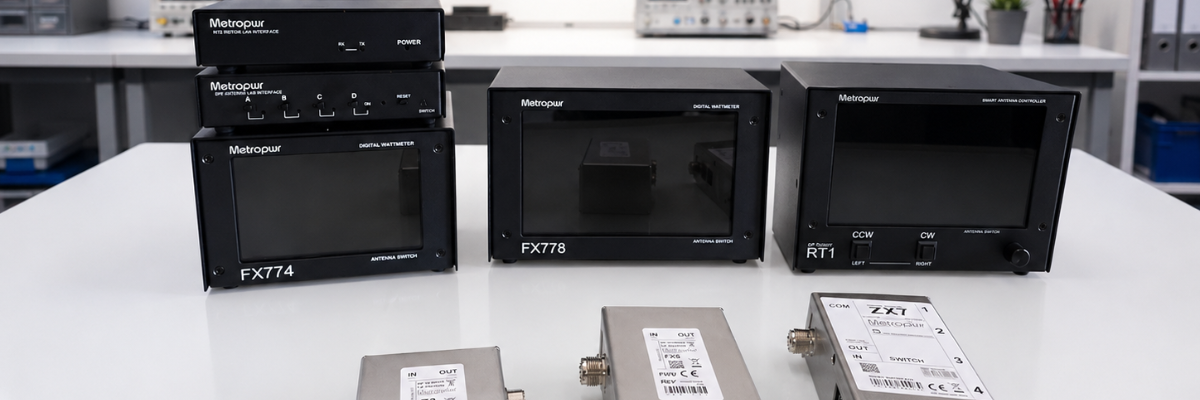
Wattmeter FX778 + Z3

7" Wattmeter — 3kW / 5kW

The FX778 paired with the Z3 sensing unit gives you a large, bright 7-inch display showing forward and reflected power in real time. Whether you're running a barefoot rig or pushing legal limit with a kilowatt amplifier, the dual 3kW and 5kW ranges keep you covered without range-switching guesswork.

The Z3 coupler is designed for low insertion loss and high accuracy across HF and 6m, with a robust build that handles sustained high-power operation without drift. The 7-inch display makes reading power levels effortless from across the shack — no squinting at a needle.

Spec Detail
Display 7-inch colour screen
Power Ranges 3kW / 5kW
Sensing Unit Z3 Wattmeter coupler
Measurement Forward & reflected power, SWR
Wattmeter FX774 + Z3

5" Wattmeter — 2kW / 5kW

For operators who want the same Z3 sensing accuracy in a more compact package, the FX774 delivers a crisp 5-inch display with 2kW and 5kW range options — ideal for a tighter operating desk or a second position in the shack.

Both wattmeters in the Metrowpwr range share the same Z3 coupler, meaning you can move the sensing unit between positions and upgrade your display without replacing your investment in the RF hardware.

Spec Detail
Display 5-inch colour screen
Power Ranges 2kW / 5kW
Sensing Unit Z3 Wattmeter coupler (shared with FX778)
Measurement Forward & reflected power, SWR
Antenna Switch ZX7

ZX7 — 1×4 Antenna Switch, 2kW

The ZX7 is a solid-state 1-into-4 antenna switch rated to 2kW — built for contesters, DXpeditioners, and anyone who regularly swaps between multiple antennas without wanting to touch a coax connector. Switching is fast, quiet, and safe at full power.

With four output ports, the ZX7 is the natural companion to the SPE interface (see below), enabling full remote antenna selection when operating over the internet. Used locally, it integrates cleanly with logging software and station controllers.

Spec Detail
Configuration 1 input × 4 outputs
Power Rating 2kW
Control Local & remote (via SPE interface)
Rotator Control RT1

RT1 — Rotator Controller for Yaesu (as Microham Arco)

The RT1 is a modern rotator controller for Yaesu rotators, designed and produced to the same specification as the well-regarded Microham Arco. If you've used the Arco, you already know what to expect: reliable, software-compatible control with a clean interface and solid logging software integration.

The RT1 connects directly to your Yaesu rotator and presents a familiar control interface compatible with the most popular shack software. For operators who want to take their beam heading control remote, the RT2 (below) extends this capability over a LAN connection.

Spec Detail
Compatible Rotators Yaesu series
Specification Equivalent to Microham Arco
Software Compatible with major logging & control software
Remote Extension Via RT2 interface (LAN/internet)
Remote Operation SPE Interface

SPE Interface — Remote Amplifier & Antenna Switch Control

The SPE interface is the gateway to running your Expert amplifier and antenna switch from anywhere in the world. Connect it at the shack end, and you can control your Expert linear amplifier — band selection, power settings, operating mode — over the internet as if you were sitting in front of it.

Combined with the ZX7 antenna switch, you gain complete RF path control remotely. Point your beam, select your antenna, fire up the amplifier, and work the pile-up — all from a hotel room, a holiday cottage, or the other side of the planet. This is serious remote station capability, not a workaround.

Function Detail
Amplifier Control Expert SPE amplifiers, over internet
Antenna Switching ZX7 1×4 switch, remote selection
Connection Internet / LAN
Use Case Full remote station operation
Remote Operation RT2

RT2 — Remote Yaesu Rotator Control via LAN / Internet

The RT2 completes the remote station picture for beam antenna operators. Working alongside the RT1 controller, the RT2 provides a LAN and internet interface so you can point your Yaesu rotator from anywhere — no need for a separate remote desktop session or a third-party relay.

Control is direct and responsive. Head into a new bearing, watch the rotator track in real time, and get on with operating. Whether you're running a remote contest station or simply controlling a home antenna from the back garden with a tablet, the RT2 makes it seamless.

Function Detail
Rotator Compatibility Yaesu rotors (via RT1)
Connection LAN / Internet
Control Real-time remote heading, position feedback
Use Case Remote beam antenna operation

A Complete System, or Piece by Piece

Every product in the Metrowpwr range works independently — but the real power is in how they combine. The wattmeters give you accurate power monitoring. The ZX7 gives you flexible antenna management. The RT1 and RT2 put your beam under network control. And the SPE interface ties your amplifier and antenna switching into a single remotely-operated station.

It's the kind of system that contest operators, DX chasers, and remote station builders have been building themselves from bits and pieces for years. Metrowpwr does it properly, in a coherent, supported package.

All products are available now. Contact us or visit the Metrowpwr product pages for full specifications, pricing, and ordering information.

Metrowpwr Range

Ready to upgrade your station?

Get in touch to discuss the full range, compatibility with your existing setup, and what combination is right for your operating style.

Metrowpwr — Professional Station Equipment for the Serious Amateur


SEEED T1000E MeshTastic Tracker
Seeed SenseCAP T1000-E: The Tracker That Disappears Into Your Pocket *, *::before, *::after { box-sizing: border-box; margin: 0; padding: 0; } :root { --ink: #1a1612; --ink-mid: #4a4540; --ink-light: …
Seeed SenseCAP T1000-E: The Tracker That Disappears Into Your Pocket
Field Notes & Hardware Reviews June 2026
Meshtastic · LoRa · GPS Tracking

The Tracker That Disappears Into Your Pocket

Seeed's SenseCAP T1000-E squeezes a GNSS module, LoRa radio, and 700 mAh battery into a credit-card frame — and costs less than a decent meal out.

Supplier
ML&S
Dimensions
85 × 55 × 6.5 mm
Battery
700 mAh
Rating
IP65
Firmware
Meshtastic / MeshCore

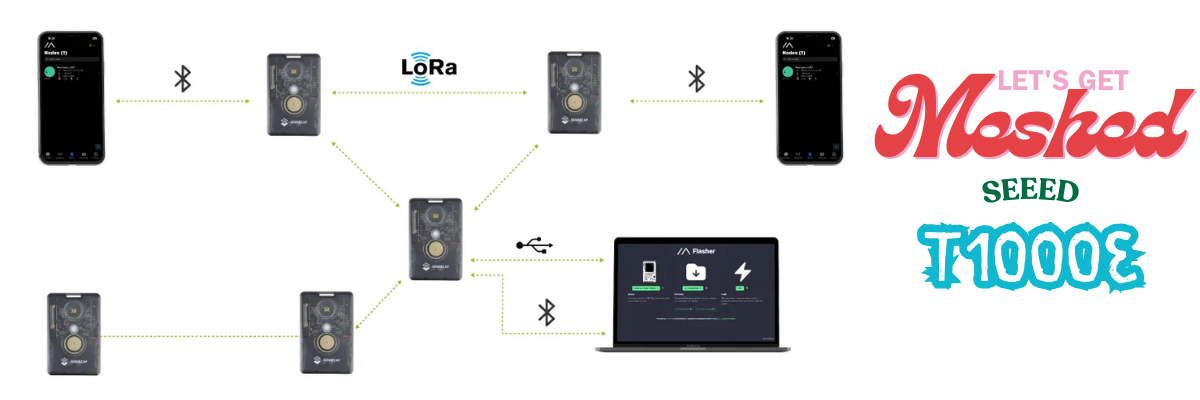
There is a certain satisfaction in hardware that simply works. No IDE needed, no soldering iron on standby, no driver dramas. You take it out of the box, flash the firmware via a web browser, pair it over Bluetooth to the Meshtastic app, and that is that — you are on the mesh. The Seeed SenseCAP T1000-E is that device.

It is, by any honest reckoning, a remarkable amount of hardware for the money. At 85 × 55 × 6.5 mm — exactly the footprint of the card slot in your wallet — it goes anywhere without complaint. Jacket pocket, rucksack hip-belt, dog collar, bicycle frame bag. The form factor is not a gimmick; it genuinely changes where and how you carry a mesh node.

"The T1000-E is the tracker you keep forgetting you're carrying — which is precisely the point."

What is inside the card

The hardware story is genuinely impressive for this price bracket. Seeed have not reached for bargain-bin silicon.

MCU
Nordic nRF52840
The same low-power chip found in the RAK4631 and LilyGo T-Echo. Sleep current sits in the single-digit microamps — essential for multi-day battery life.
LoRa Radio
Semtech LR1110
Covers global ISM bands from 863–928 MHz. The LR1110 is a more integrated transceiver than the ubiquitous SX1262, with solid sensitivity figures.
GNSS
Mediatek AG3335
A dedicated, multi-constellation GPS module. High-precision positioning for real-time location sharing without any cellular dependency.

That Mediatek GPS chip deserves a moment. A dedicated GNSS module — not a software-defined approximation, not Wi-Fi triangulation — at this price point is genuinely uncommon. It is the sort of component that makes the overall proposition rather difficult to argue with.

Range and real-world performance

Range is where devices with integrated antennas typically take their lumps, and physics being what it is, the T1000-E is no exception. Without an external antenna, it cannot match a full-size handheld mesh node. That said, field tests have demonstrated reliable contact with base stations elevated over 50 metres, and solid city-block-scale coverage to vehicle nodes. For the use cases the form factor implies — personal tracking, asset tagging, lightweight mesh participation — it is more than adequate.

In urban environments, expect somewhere in the region of one and a half to two kilometres of practical range with obstructions in the way. Out in open countryside, rather more. The key insight is that a T1000-E riding in your rucksack, contributing to the mesh as a relay node whilst simultaneously reporting your position, is doing something no full-size node can manage from a trouser pocket.

The charging compromise

The one polarising design decision is charging. Rather than USB-C, the T1000-E uses a four-pin pogo connector — magnetic, proprietary, and the reason the device can be sealed to IP65. The trade-off is deliberate: the sealed casing is meaningfully more rugged than anything with a port flap, and IP65 means genuine protection from rain and dust. It does, however, mean carrying a dedicated charging puck, which some will find a mild irritant and others will consider a non-issue.

Battery life lands at several days on standby with GPS disabled, or roughly a full day with active location tracking. Use it hard as a repeating node with frequent position broadcasts and you will be charging it each evening — perfectly manageable, but worth knowing before you head out on a multi-day trip.

Getting started

Setup is refreshingly straightforward. Navigate to the Meshtastic Web Flasher, select the T1000-E from the device list, and flash. No IDE, no command line, no drivers. The device ships with firmware pre-installed, so for most users it is simply a matter of pairing over Bluetooth and selecting your region in the app — you will be on the mesh within minutes of unboxing.

The pogo pins also serve as a developer interface: USB, serial logging, and a DFU mode are all accessible there for anyone who wishes to dig into the firmware, or who wants to run it as a LoRaWAN asset tracker rather than a Meshtastic node — a separate firmware variant is available for that purpose.

· · ·

Verdict

Strengths

  • Genuinely credit-card sized and pocketable
  • Dedicated AG3335 GPS — real precision
  • IP65 rated — splash and dust resistant
  • No-code setup via web flasher
  • Supports Meshtastic and MeshCore
  • Multi-day standby battery life
  • Clip and carabiner attachment included
  • Exceptional value for money

Limitations

  • Proprietary pogo-pin charging, not USB-C
  • No external antenna option
  • Range trails larger, external-antenna nodes
  • GPS-on battery life is roughly one day
  • No display or buttons for standalone use
9
/ 10
Final verdict
The T1000-E is the easiest recommendation in Meshtastic hardware right now. If you need a no-fuss tracker to keep tabs on a person, pet, or a piece of kit — and you want it to participate in the mesh whilst doing so — nothing else at this price comes close. The pogo charging is the only genuine friction, and even that becomes second nature quickly. Pick one up from ML&S, flash it, and forget you are carrying it.
Meshtastic LoRa GPS Seeed Studio Mesh Networking Off-Grid
Available from ML&S · hamradio.co.uk

SunSDR DX2 connection to MixW a guide..
SunSDR DX — CAT Control with MixW2 & Omnirig | Gazlabs @import url('https://fonts.googleapis.com/css2?family=IBM+Plex+Mono:wght@400;600&family=IBM+Plex+Sans:wght@400;500;600&display=swap'); *, *::befo…
SunSDR DX — CAT Control with MixW2 & Omnirig | Gazlabs
Gazlab
gazlabs.co.uk

SunSDR DX — CAT Control with MixW2 & Omnirig  •  Setup & Troubleshooting Guide

How It Works

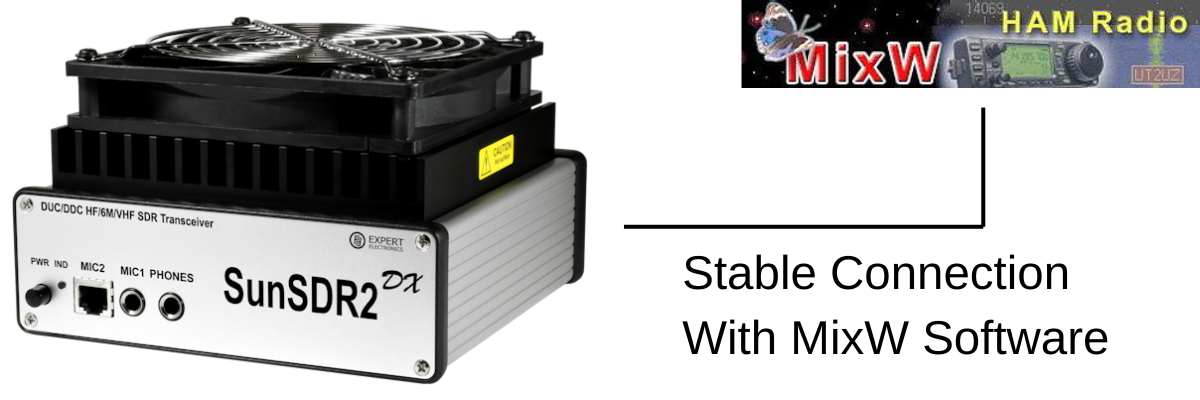
ExpertSDR2 emulates a Kenwood TS-480 via ECATv1 over a virtual COM port pair. Omnirig connects to that port and acts as a CAT broker for MixW2. Audio routes via Virtual Audio Cable (VAC).

ExpertSDR2 (ECATv1) → Virtual COM pair → Omnirig → MixW2
Step 1 — Install a Virtual COM Port Pair
  • com0com (free) — sourceforge.net/projects/com0com
  • VSP Manager by K5FR (free) — k5fr.com

Create a pair using low numbers e.g. COM5 ↔ COM6. ExpertSDR2 uses one end; Omnirig the other.

Note: Enable Emulate baud rate in com0com on both ends — without it, idle silence is treated as a dead connection.
Step 2 — Configure ExpertSDR2 (ECATv1)

Options > ECATv1 > tick Enable CAT:

SettingValue
Virtual COM portCOM5 (first end of pair)
Baud rate115200
Data / Parity / Stop8 / None / 1
Rig emulationKenwood TS-480
Step 3 — Configure Omnirig

Settings > Rig 1:

SettingValue
Rig typeKenwood TS-480
PortCOM6 (second end of pair)
Baud rate115200
Data / Parity / Stop8 / None / 1
RTS / DTRHigh / High
Poll interval100 ms (critical — keeps connection alive)
Timeout4000 ms
Note: 100 ms poll means Omnirig queries the radio constantly, even when idle. Without this the connection drops on inactivity.
Step 4 — Configure MixW2

Configure > TRX/CAT > select Omnirig / Rig 1. MixW2 talks to the radio through Omnirig — no direct COM port needed.

Step 5 — Audio via Virtual Audio Cable

Install VAC from vac.muzychenko.net. Enable the VAC button in ExpertSDR2.

ProgramInputOutput
ExpertSDR2VAC Line 2 (TX from MixW2)VAC Line 1 (RX to MixW2)
MixW2VAC Line 1VAC Line 2
Fixing CAT Drops on Inactivity

Drops when you stop tuning or change focus? Idle timeout somewhere in the chain. Work through these:

FixAction
1  Omnirig poll 100 msSet poll interval to 100 ms. Keeps traffic flowing so port never goes idle.
2  Windows USB powerDevice Manager > Ports > right-click COM port > Power Management > uncheck allow sleep. Repeat for USB Root Hubs. Set Power Plan to High Performance.
3  com0com baud rateTick Emulate baud rate on both ends of the virtual pair.
4  Omnirig timeoutSet timeout to 4000 ms.
5  Switch to TCI/SDCReplace ECATv1 with TCI via SDC. Most stable fix — see section below.
6  Update ExpertSDR2Older versions had CAT bugs. Get latest from expertelectronics.ru.
7  Low COM numbersKeep ports below COM10 — high numbers cause issues in some software.
Tip: If fixes 1–4 don’t solve it, go straight to TCI/SDC (Fix 5). It’s the only method confirmed fully stable by SunSDR DX users.
Advanced: Stable Connection via TCI and SDC
What is TCI?  TCI (Transceiver Control Interface) is Expert Electronics’ native protocol for ExpertSDR2. It runs over a WebSocket on localhost — not a serial port emulation. Persistent, fast, doesn’t go idle.

SDC bridges TCI to a virtual COM port so Omnirig connects normally. ECATv1 is removed from the chain.

ExpertSDR2 (TCI/WebSocket) → SDC → Virtual COM → Omnirig → MixW2
Real-world fix:  Customer tried every method — all dropped. Switched to TCI/SDC — instant stable connection. Catch: RIG Emulator was missing in SDC because the version was too old. Fix: find the cumulative update on the UT4LW site, get a reg key, update. Working version: SDC v19.06 x64.
Step A — Enable TCI in ExpertSDR2

Options > TCI > tick enable:

SettingValue
Enable TCITick
Port50001 (default)
Addresslocalhost / 127.0.0.1
Step B — Install SDC (version matters)

Download from UT4LW website. If RIG Emulator is missing, the version is too old.

Note: Get the cumulative update — requires a registration key. Confirmed working: SDC v19.06 x64.
  • Add TCI Client → address: localhost, port: 50001
  • Add RIG Emulator output → assign to COM7
Step C — Point Omnirig at SDC

Change Omnirig port from COM6 to COM7 (the SDC RIG Emulator). All other settings stay the same.

Note: ECATv1 and TCI can run together in ExpertSDR2. Test SDC alongside your existing setup before switching fully.
Quick Reference

Standard (ECATv1):

SoftwarePortRole
ExpertSDR2 ECATv1COM5CAT out (TS-480 emulation)
Omnirig Rig 1COM6CAT in (100 ms poll)
MixW2OmnirigVia Omnirig Rig 1
ExpertSDR2 VACVAC Line 1RX audio to MixW2
MixW2 audio outVAC Line 2TX audio to ExpertSDR2

Stable (TCI + SDC v19.06 x64):

SoftwarePort / AddressRole
ExpertSDR2 TCIlocalhost:50001TCI WebSocket server
SDC TCI Clientlocalhost:50001Connects to ExpertSDR2
SDC RIG EmulatorCOM7Virtual CAT port for Omnirig
Omnirig Rig 1COM7CAT in (100 ms poll)
MixW2OmnirigVia Omnirig Rig 1
ExpertSDR2 VACVAC Line 1RX audio to MixW2
MixW2 audio outVAC Line 2TX audio to ExpertSDR2
gazlabs.co.uk  •  Ham Radio, Electronics & IT

Is AI Taking over the world?
🤖 Is AI taking over the world, or are we all just helping it move in? Today it's writing emails, creating images, answering questions, and helping with work. Tomorrow... ✅ Emptying the bins ✅ Driving …
🤖 Is AI taking over the world, or are we all just helping it move in? Today it's writing emails, creating images, answering questions, and helping with work. Tomorrow... ✅ Emptying the bins ✅ Driving trains ✅ Flying aircraft ✅ Running customer service ✅ Managing businesses ✅ Telling us what to watch, eat, buy and think about next But here's the thing... If AI eventually does most of the skilled jobs, where will the next generation of experts come from when something goes wrong? Who fixes the AI when the people who would have learned those skills never got the chance because AI was already doing the job? Are we heading towards a futuristic utopia where machines handle all the boring stuff, or are we creating the world's biggest game of Chinese Whispers, where AI learns from AI, which learned from AI, until nobody really knows where the original answer came from? 🤔 Will it be flying planes and running railways while we're all putting our feet up? Or will the whole thing eventually hit a wall and fizzle out because there aren't enough people left who understand how it all works? Genuinely curious what people think. Is AI the future... or are we currently living through the biggest technology experiment in history? 🤖🍿🌍 PS written by AI... GazLabs is a little bit scared now... I peeked through the AI window and saw a shadow, or was it just a dirty mark on a wall lol

New website, New direction..
Hope you like it I have spent an enormous amount of time working out how and what I wanted to do and learned 200 new skills along the way! Gaz

CiroLoop Fault Finder
Check out the Ciro Baby Loop Fault Finder — a web-based tool to diagnose issues with your Ciro Baby Loop antenna. Enter your symptoms and get guided troubleshooting steps.

Check out the Ciro Baby Loop Fault Finder — a web-based tool to diagnose issues with your Ciro Baby Loop antenna. Enter your symptoms and get guided troubleshooting steps.


Wouxun 980PL Software
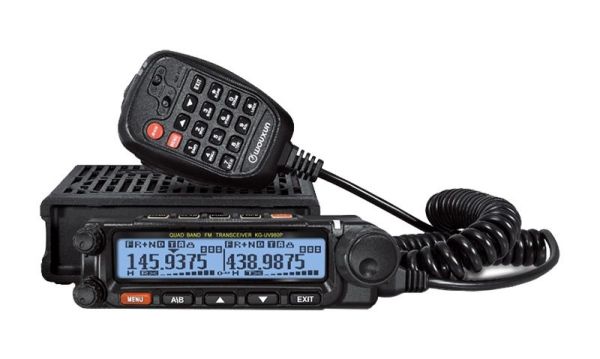
Key FeaturesDual Band: VHF and UHF frequency coverage for versatile communication options.High Power Output: Up to 50 watts of power output for extended range.Wide Frequency Range: Covers 136-174 MHz …

Key Features

  • Dual Band: VHF and UHF frequency coverage for versatile communication options.
  • High Power Output: Up to 50 watts of power output for extended range.
  • Wide Frequency Range: Covers 136-174 MHz and 400-490 MHz.
  • Large LCD Display: Easy to read and navigate.
  • Scanning Modes: Multiple scanning modes for finding active channels.
  • Built-in Speaker: Clear and loud audio output.
  • Durable Construction: Rugged design for tough environments.

Fun Ways to Use It

  • Road Trips: Stay connected with fellow travelers on long journeys.
  • Outdoor Adventures: Keep in touch with your group while hiking, camping, or exploring.
  • Emergency Preparedness: Have a reliable communication tool during natural disasters or emergencies.
  • Community Events: Coordinate with volunteers at marathons, parades, and festivals.

Tips for Getting the Most Out of Your Wouxun 980PL

  • Take Time to Learn the Features: Although the menu is simple, reading the manual will help you discover all of its capabilities.
  • Keep the Firmware Updated: Visit Wouxun's website (wouxun.com) periodically to check for firmware updates that may improve performance or add new features.
  • Always Practice Good Etiquette: Use clear and concise language, and listen before transmitting.
  • Check Your Antenna: An antenna analyzer can ensure your antenna is properly tuned for the frequencies you use most.

Conclusion

The Wouxun 980PL is a feature-rich dual band radio for amateur radio enthusiasts and professionals. Its high power output and range make it ideal for communication across long distances. With proper use and care this radio can provide years of reliable service.